1. Why I'm Comparing These
A baby monitor sounded like one of those things I'd buy in ten minutes and never think about again. Then our actual bedtime routine started happening in the real world, with a sleeping baby in the nursery, a sink full of bottles, one parent trying to eat dinner while the other keeps asking, "Did you hear that? " and suddenly I was deep in tabs, reviews, Reddit threads, and product manuals like this was an enterprise software procurement project 😅
What pushed this from "nice to have" into a real decision was pretty simple: I needed something my wife and I could trust at 2 a. m. without adding friction to an already tired household. That's the part spec sheets don't really show. A baby monitor isn't just about video quality. Yep. It's about how fast you can check the nursery when your brain is half asleep, whether alerts are useful or annoying, whether you want a dedicated screen or you'd rather keep everything inside your phone, and whether a smart home style setup actually makes family life smoother or just adds another app to babysit.
We used to have a different brand and honestly the switch was night and day
if you've tried this drop a comment below
literally The two that kept showing up for us were eufy SpaceView Pro and Nanit Pro. Very different vibe. eufy leans toward the "just work, please" camp. Nanit is more like the data-heavy, app-centric monitor that wants to be part baby cam, part sleep analytics platform, part nursery command center. Sounds great. But do you genuinely need all that?
I know I know another review but stay with me
I also had one annoying constraint that made this way more practical than theoretical: our apartment layout. The nursery isn't huge, Wi‑Fi is good but not perfect in every corner, and I really didn't want to spend premium money only to discover that the experience was technically impressive and emotionally irritating (which, tbh, happens with smart gadgets more than brands would like to admit).
So yeah, that's why this comparison mattered. Wild. Not because I wanted the "best" baby monitor in some abstract review-lab sense, but because I wanted the one that would fit real family life without turning nighttime into an IT support ticket lol.
2. Quick Comparison Table
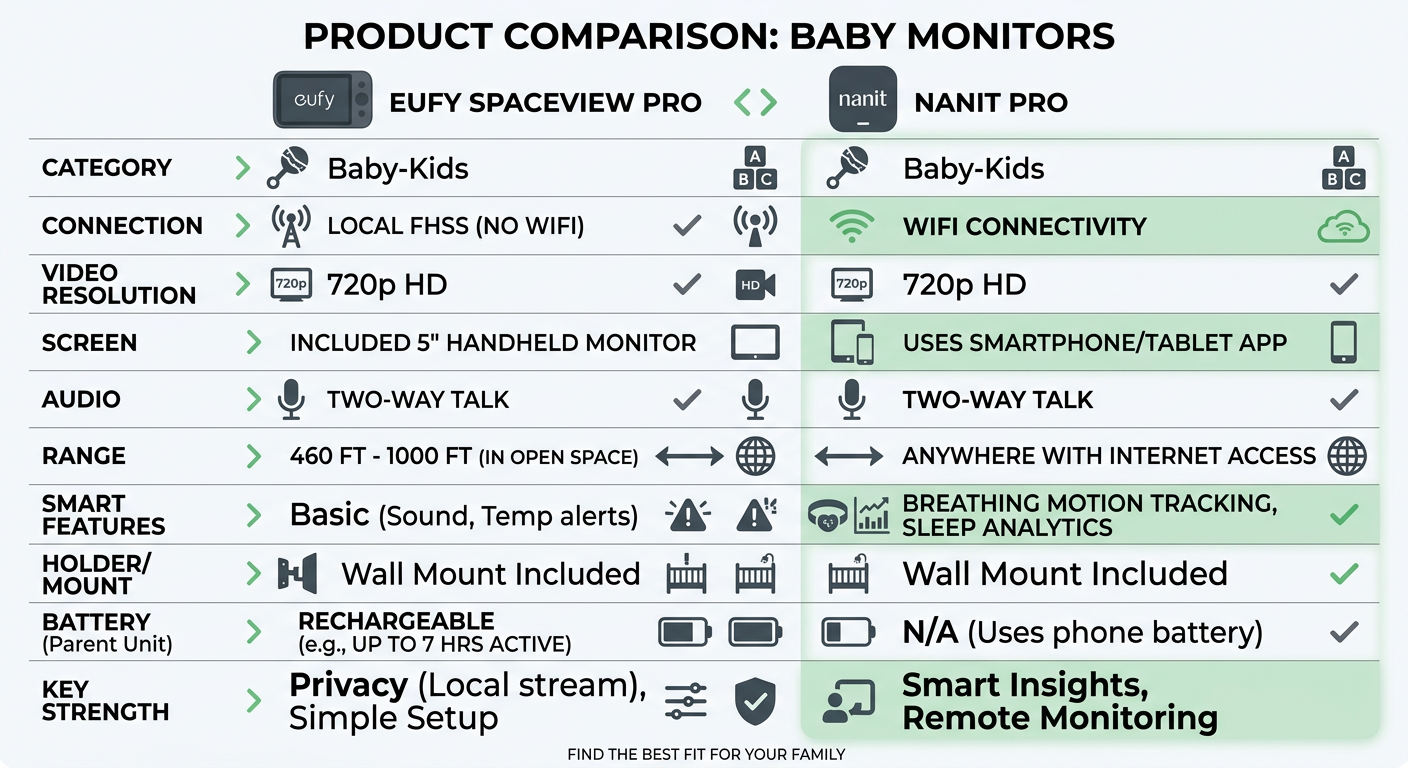
| Item | eufy SpaceView Pro | Nanit Pro |
|---|---|---|
| Price | Usually mid-range for a dedicated monitor setup; monitor included. Price disclaimer: prices change often depending on sales and bundle options. | Usually premium-priced, and the total can climb depending on stand/accessories/subscription. Price disclaimer: prices change often depending on sales and bundle options. |
| Core performance metric | Reliable dedicated video monitoring with local-style direct viewing and good night visibility | High-resolution app-based monitoring with advanced tracking and sleep insights |
| Size/Weight | Camera is compact enough for shelf/wall placement; parent unit adds extra device to carry | Camera itself is sleek, but full setup can take more nursery planning depending on mount/stand |
| Battery/Power | Parent monitor battery is a real advantage for moving around the house without reaching for your phone | Camera is powered; phone becomes your viewing device, so your own battery becomes part of the equation |
| Noise level | No major mechanical noise issue; alert sounds are direct and obvious | Also not a "noisy device," but notification behavior depends a lot on app settings and your phone setup |
| Warranty | Typically standard limited manufacturer warranty | Typically standard limited manufacturer warranty |
| Verdict tag | Best for simplicity | Premium smart pick |
The weird thing? That table looks tidy, but living with either of these probably won't feel tidy at all. One of them solves a problem by removing decisions. The other gives you more information so you can make better decisions. Same category, totally different philosophy.
And honestly, that's what made this harder. If both were just cameras, I'd have clicked buy and moved on.
spoiler alert: this was the dealbreaker
3. Deep Dive — One Product at a Time
eufy SpaceView Pro
The eufy SpaceView Pro makes sense the second you understand what it's trying not to be. It isn't trying to become your whole parenting dashboard, and it doesn't really care about impressing you with analytics. It gives you a dedicated parent unit, a camera feed, solid night viewing, and a much lower dependency on your home's Wi‑Fi setup. Wild. For a lot of families, that simplicity is the feature.
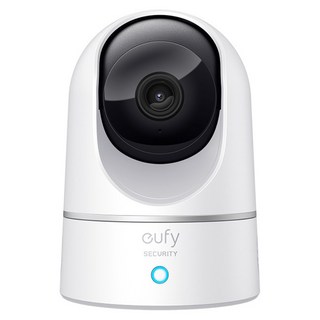
That dedicated screen is a bigger deal than it sounds. In regular life, your phone is already carrying too much. Work messages, calendar alerts, delivery notifications, family chat, random app chaos. Wild. Having a separate screen for the nursery means checking on the baby doesn't involve unlocking your phone, opening an app, or wondering whether the feed lagged because your network hiccupped. Yeah, it makes a difference.
okay side note —
I also like that this kind of setup feels easier to hand off. Grandparents can use it. A babysitter can use it. My sleep-deprived self could definitely use it. No tutorial required, basically.
If I were dropping in an affiliate link naturally, it'd be something like this: I saw the eufy SpaceView Pro on Amazon hovering around that mid-range baby monitor zone pretty often, which made it feel easier to justify than some of the subscription-heavy options. Wild. Price disclaimer: prices change often depending on sales and bundle options.
spoiler alert: this was the dealbreaker
Now for the honest part.
The weakness isn't hidden. It's just not as "smart" as the smart crowd wants. No kidding. If you're the kind of parent who finds comfort in trend data, movement patterns, app history, or having a cleaner smart home workflow around the nursery, eufy can feel a little plain. Not bad. and Plain. And plain is either exactly what you want or exactly what you'll outgrow.
the unboxing experience alone was worth mentioning
Clear strength: a genuinely low-friction experience with a dedicated screen that works well for real-time check-ins.
Real weakness: fewer advanced insights and less ecosystem depth if you're expecting a data-rich nursery setup (and if that's your thing, you'll feel the ceiling pretty fast).
A small tangent: I briefly looked at a few other app-only monitors in this space, but a lot of them seemed to land in the same weird zone where they promised convenience while quietly assuming your phone battery, Wi‑Fi stability, and notification sanity were all unlimited. They aren't. Not in a house with a baby 😂
Nanit Pro
The Nanit Pro is the one that pulls you in if you like clean apps, sleep insights, and the idea of turning the nursery into a more measured, trackable environment. It feels modern in a very specific way. Not just "new gadget" modern, but "this product wants to generate a layer of useful parenting information over time" modern.
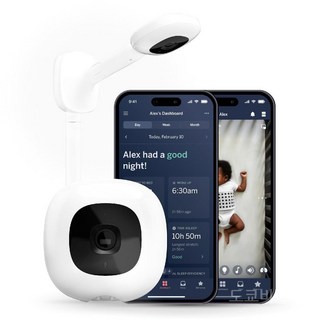
That can be really compelling. If you care about sleep patterns, motion alerts, breathing or routine-adjacent monitoring features depending on your setup, and the comfort of being able to open an app from anywhere, Nanit clearly has more ambition than a basic monitor. It doesn't just show you the room. It tries to help interpret what life in that room looks like over time.
this is where it gets interesting though
And yes, for some parents, that's not fluff at all. It's reassurance. A lot of reassurance.
But here's where my IT brain kicked in. Systems with more capability usually come with more dependencies. Seriously. More dependencies means more setup, more account stuff, more "why is this behaving differently today than yesterday? " moments. and Not always. But often. Do those extra features actually help at 3 a. m. , or do they mostly feel impressive at 3 p. m. while you're reading product pages? Kind of both, ngl.
okay side note —
The Nanit Pro on Amazon is usually priced like a premium nursery camera, and once you factor in accessories or feature tiers, it's definitely something I'd classify as an intentional spend rather than an impulse buy. No kidding. Price disclaimer: prices change often depending on sales and bundle options.
I don't want to undersell the good here. The app-centric experience is polished, the camera quality is strong, and if your household already leans digital, it fits naturally into that rhythm. You may genuinely love it.
okay side note —
Still, the downside is real. This product asks more from you. It asks for stable Wi‑Fi. It asks for more trust in software. It asks you to be okay with using your phone as part of the system. Wild. And if your idea of peace is "press one button, see baby, go back to whatever you were doing," Nanit can feel like overkill (even if it's very good overkill).
okay real talk for a second
Clear strength: excellent app-based monitoring with richer insights and a more advanced nursery experience. haha
honestly Real weakness: higher cost and more reliance on your network, your phone, and a more layered setup overall.
Also, tiny parent-life aside: there is something very funny about spending this much time comparing baby monitors while the baby, meanwhile, has no respect for any schedule, no understanding of your budget, and absolutely zero appreciation for industrial design ㅎㅎ
4. Who Should Buy Which
Go with eufy SpaceView Pro if…
- If you want a monitor your partner, parents, or sitter can use instantly, go with eufy SpaceView Pro. Handing someone a dedicated screen is just easier than asking them to download an app and log into anything.
- If you don't want the nursery feed competing with work Slack, texts, and everything else on your phone, go with eufy SpaceView Pro. That separation is weirdly calming once you try it.
- If your Wi‑Fi is decent but not flawless in every room, go with eufy SpaceView Pro. This was a bigger factor for me than I expected.
- If your ideal baby monitor is basically "show me the baby clearly and don't make me think," go with eufy SpaceView Pro. Seriously, that's not low standards. That's knowing what kind of friction your house can tolerate.
Right after writing that, I can already hear some tech-minded parents saying, "But isn't that kind of old-school? " Maybe. But old-school isn't automatically bad when the task is checking whether your child is awake, rolling around, or just making weird sleep noises into the void.
Go with Nanit Pro if…
- If you already use app-based devices all over the house and actually like that style of control, go with Nanit Pro. It fits naturally into that kind of environment.
- If you want more than a live feed and care about sleep trends, alerts, and richer nursery data, go with Nanit Pro. This is the whole reason it exists.
- If you travel, multitask, or want to check in remotely from your phone without carrying a separate monitor, go with Nanit Pro. For some families, that's huge.
- If you'd rather pay more for a more software-driven experience than save money on a simpler device, go with Nanit Pro. Price isn't everything, and sometimes the more expensive tool really does map better to how you live.
Still, I'd only say that if you're being honest with yourself about how much "smart" you actually enjoy. Some people love dashboards. Some people say they love dashboards and then never open them after week two (I have definitely done this with other gadgets, so like. . and . I'm not judging).
(I spent way too long researching this)
5. FAQ
Is Nanit Pro actually better than eufy SpaceView Pro, or just more advanced?
More advanced, yes. Automatically better? Not really. If what you need is a dependable baby monitor that gives you quick eyes on the nursery with minimal setup stress, eufy can feel better in daily use even if Nanit has more features. Exactly. Better depends a lot on whether extra data calms you down or just adds another layer to manage.
update: still using it three weeks later so
Does a dedicated monitor still make sense when everyone already has a smartphone?
Honestly, yes. I didn't fully appreciate this until I imagined the real-life workflow. Yep. A dedicated screen means no app switching, no battery drain on your phone, no accidental Do Not Disturb weirdness, and less chance that a random call or notification interrupts how you check the nursery. That's boring in the best possible way.
Is Nanit Pro worth the extra money for first-time parents?
Sometimes. If you're the kind of first-time parent who finds reassurance in more information, more visibility, and a more connected smart home style setup, then the premium can make emotional sense, not just technical sense. But if you're already overwhelmed and know you prefer simpler tools, paying more won't magically make the experience easier (and that's the trap, tbh).
(I spent way too long researching this)
6. My Pick — and Why
If I were buying one for my own house today, I'd go with eufy SpaceView Pro.
Not because Nanit Pro isn't impressive. It is. The app experience is stronger, the data angle is more compelling, and I totally get why some parents love that kind of connected nursery setup. No kidding. But once I strip away the part of my brain that loves comparing specs and looking at feature matrices, the more human answer is that I want fewer moving parts in the middle of family life.
I went back and forth on this for like a week
That's really it.
I know myself. and I work in IT. I can troubleshoot almost anything. And precisely because I do that all day, I don't want my nighttime baby-check routine depending on one more app, one more login, one more Wi‑Fi variable, one more battery drain problem. The eufy approach just feels calmer. Less elegant on paper, maybe. More usable in real life, definitely.
my wife would kill me for saying this but
Price is part of this too, and I don't think there's any point pretending otherwise. The eufy SpaceView Pro usually lands in a range that feels easier to swallow than the fuller Nanit Pro setup, especially if you're already buying all the other nursery gear that somehow adds up terrifyingly fast 😅 If you want to check current prices, Amazon's usually competitive on both once the links are inserted here. Price disclaimer: prices change often depending on sales and bundle options.
So yeah, my pick is eufy. Not because it's the flashy answer. Because at the end of the day, the best baby monitor for our nursery would be the one that helps us feel less busy, less distracted, and a little more at ease while our kid sleeps. And honestly, that matters more than having the smartest graph in the room ❤️
look I'm not sponsored I swear
As an Amazon Associate I earn from qualifying purchases.